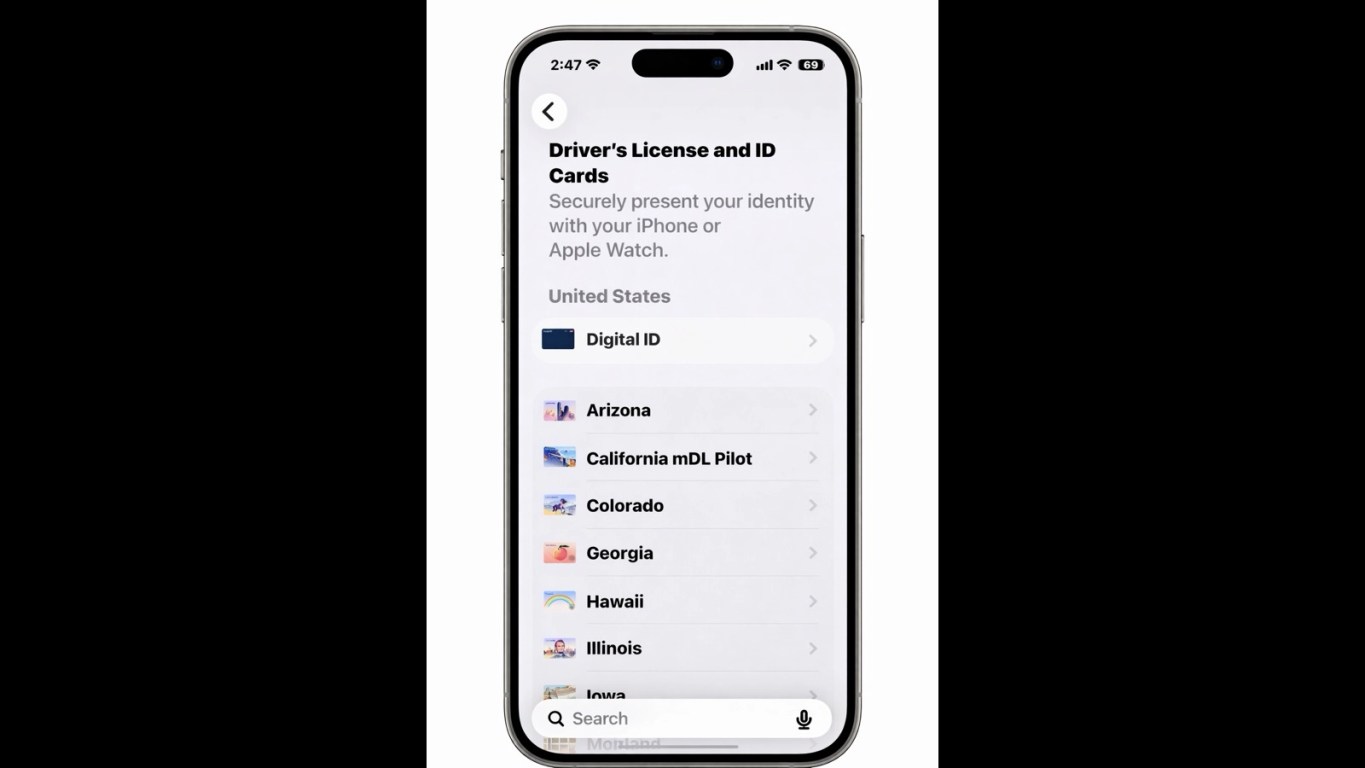
Digital Identity Is Boarding Now and Culture Is Coming With It
A shift is happening at airport security, and it signals something much bigger than convenience.
Travelers in the United States can now store a verified digital identity inside the Wallet app created by Apple Inc. Instead of handing over a physical license or passport, people can confirm who they are using their phone or watch at checkpoints run by the Transportation Security Administration.
It’s fast. It’s encrypted. And culturally, it marks a turning point in how identity itself is evolving.
The Airport Experience Reinvented
Airport security has long been defined by physical proof: paper boarding passes, plastic licenses, stamped passports. Digital ID changes that rhythm.
At participating checkpoints, travelers can verify their identity simply by presenting their device. No digging through bags. No handing documents to an agent. No physical exchange required.
For a generation accustomed to frictionless payments and instant authentication, this feels less like innovation and more like the natural next step.
Where Digital ID Works Right Now
Adoption is expanding gradually, reflecting how identification rules still operate at the state and territorial level.
Driver’s licenses and state IDs in mobile wallets are currently supported in:
• Arizona
• Colorado
• Georgia
• Hawaii
• Illinois
• Iowa
• Maryland
• Montana
• Ohio
Acceptance varies by airport and location, so travelers still need to check checkpoint signage to confirm availability. Some businesses and digital platforms are also beginning to accept mobile identity verification, both in person and online.
The infrastructure is forming, but it’s still growing.
Privacy Is Central to the Pitch
Digital identity adoption depends on trust, and the system is built around that idea.
Identity data is encrypted and protected against tampering. Verification requires biometric confirmation, meaning only the device owner can present it. And importantly, presenting a digital ID does not create a tracking log of when or where it was used.
That last point reflects a major cultural shift: convenience alone isn’t enough anymore. People expect convenience without surveillance.
How You Actually Create a Digital ID

Setting one up is designed to feel familiar, similar to adding a payment card.
The process involves:
1. Opening the Wallet app and tapping + and selecting Digital ID
2. Scanning the photo page of your U.S. passport
3. Holding your iPhone to the passport’s embedded chip
4. Completing identity confirmation and then you’re done.
Once verified, the credential is stored securely on the device.
To create one, you must have a valid, unexpired U.S. passport and a compatible device (generally newer smartphone and smartwatch models running current operating systems). Older devices may not support the feature.
Device and System Requirements Matter
Digital identity may feel futuristic, but access depends heavily on having the right technology.
To use mobile driver’s licenses or state IDs in Wallet, travelers need a compatible smartphone or smartwatch running supported operating systems. In most cases, that means a relatively modern device, generally iPhone 8 or newer and Apple Watch Series 4 or newer, with updated software. Some regions require even newer systems. For example, California and Puerto Rico require later operating system versions than other states.
Verification at businesses or apps may also require a compatible third-party application and newer device models capable of secure digital ID authentication.
Passport-based Digital ID has its own requirements. To create one, you must have:
• A valid, unexpired U.S. passport
• A compatible device (typically iPhone 11 or newer, or Apple Watch Series 6 or newer)
• Current operating software that supports Digital ID setup
• The ability to scan the passport photo page and read the embedded chip
Even with the right device, usage is still limited. Passport-based Digital ID can currently be used only at select airport security checkpoints for domestic travel. It cannot replace a physical passport for international travel or border crossings. And despite the digital shift, physical identification is still required in many real-world situations, especially those involving law enforcement or locations where mobile ID isn’t accepted.
The future may be digital. But for now, access depends on both technology and geography.
This Isn’t a Total Replacement Yet
Despite the excitement, digital identity does not replace physical identification.
You will still need physical documents for:
• International travel and border crossings
• Situations involving law enforcement
• Locations that don’t accept digital ID
• Any function that legally requires a physical passport
Digital ID currently works primarily for domestic identity verification at select airport checkpoints and certain participating businesses. Think of it as an additional credential, not a full transformation of identification systems. At least not yet.
The Cultural Meaning Behind the Technology
What makes this moment significant isn’t just the convenience of faster airport lines.
Identity has historically been tangible; paper, plastic, stamps, signatures. Now it’s becoming encrypted, biometric, and stored in devices people rarely put down.
That shift changes how trust is established. It changes how presence is proven. And it quietly redefines what it means to “carry” your identity at all.
Air travel is simply where most people will notice the change first. But culturally, the transformation is much bigger than the airport.
Author Bio
Andrew Greene is a quality-obsessed, results-driven powerhouse with nearly two decades of experience transforming complexity into clear, actionable solutions. His secret weapon? A mix of analytical sharpness, problem-solving precision and a communication and leadership style that’s equal parts clarity and charisma. From Quality Assurance to political data analysis, you can think of him as the Swiss Army knife of operational excellence, minus the corkscrew (unless it’s a team celebration).
![[The File 003]: The Final Handshake: Jordan vs. Magic (1996)](https://deckedoutmagazine.com/wp-content/uploads/2026/02/jordan-magic-1996-final-meeting-game.webp)